
Pillar Guide
A2P 10DLC for Sole Proprietors Without an EIN: The Complete 2026 GoHighLevel Guide
Yes, you can register A2P 10DLC without an EIN through GoHighLevel's Sole Proprietor tier. Here's the honest tradeoffs, the eight rejection traps that kill most submissions, and the step-by-step path to first-pass approval.
If you run a GoHighLevel agency, you’ve almost certainly hit this scenario: a new client lands, you start their A2P 10DLC registration, and the EIN field stops you cold. They don’t have one. They’re a real-estate agent operating under their own name, a fitness coach, a solo law practice, a chiropractor with a new shingle. Real people doing real business — just without the formal entity paperwork.
The good news is GoHighLevel’s Trust Center has a dedicated path for them. The bad news is most agencies misuse it, get rejected, and waste weeks on resubmissions while the client wonders why they can’t text yet.
This guide covers the complete picture: what Sole Proprietor registration actually gets you, where the throughput ceiling sits, the eight rejection traps that kill most submissions, and the step-by-step path that gets you approved on the first try.
The Sole Proprietor Tier Explained
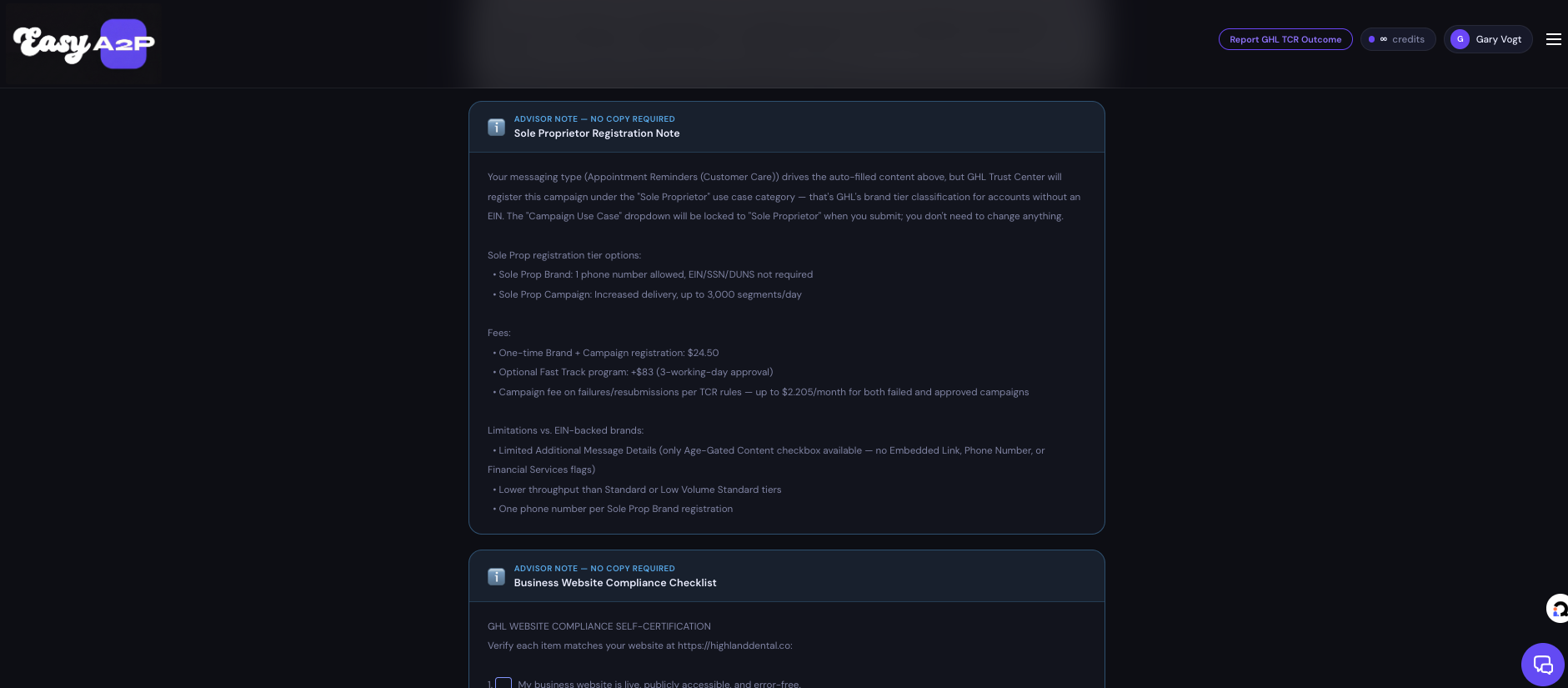
Yes, you can register A2P 10DLC without an EIN. GoHighLevel’s Sole Proprietor tier exists specifically for that case. The tradeoffs:
- Hard cap of 3,000 daily message segments (T-Mobile enforces a stricter 1,000/day limit on top of that)
- One phone number, one campaign — that’s the entire brand
- No Trust Score (Sole Props skip secondary vetting)
- $24.50 one-time fee (includes Fast Track for 3-working-day approval) + up to $2.21/month recurring
- 24-72 hour approval (typical for Sole Prop, faster than Standard tier)
- Limited Additional Message Details — only the Age-Gated Content checkbox is available; no Embedded Link, Phone Number, or Financial Services flags
For a low-volume single-client use case — solopreneur, single-location service business — this works fine. For agency-managed multi-channel marketing campaigns, you will outgrow this tier within months and need to re-register as Low Volume Standard or Standard, which requires an EIN.
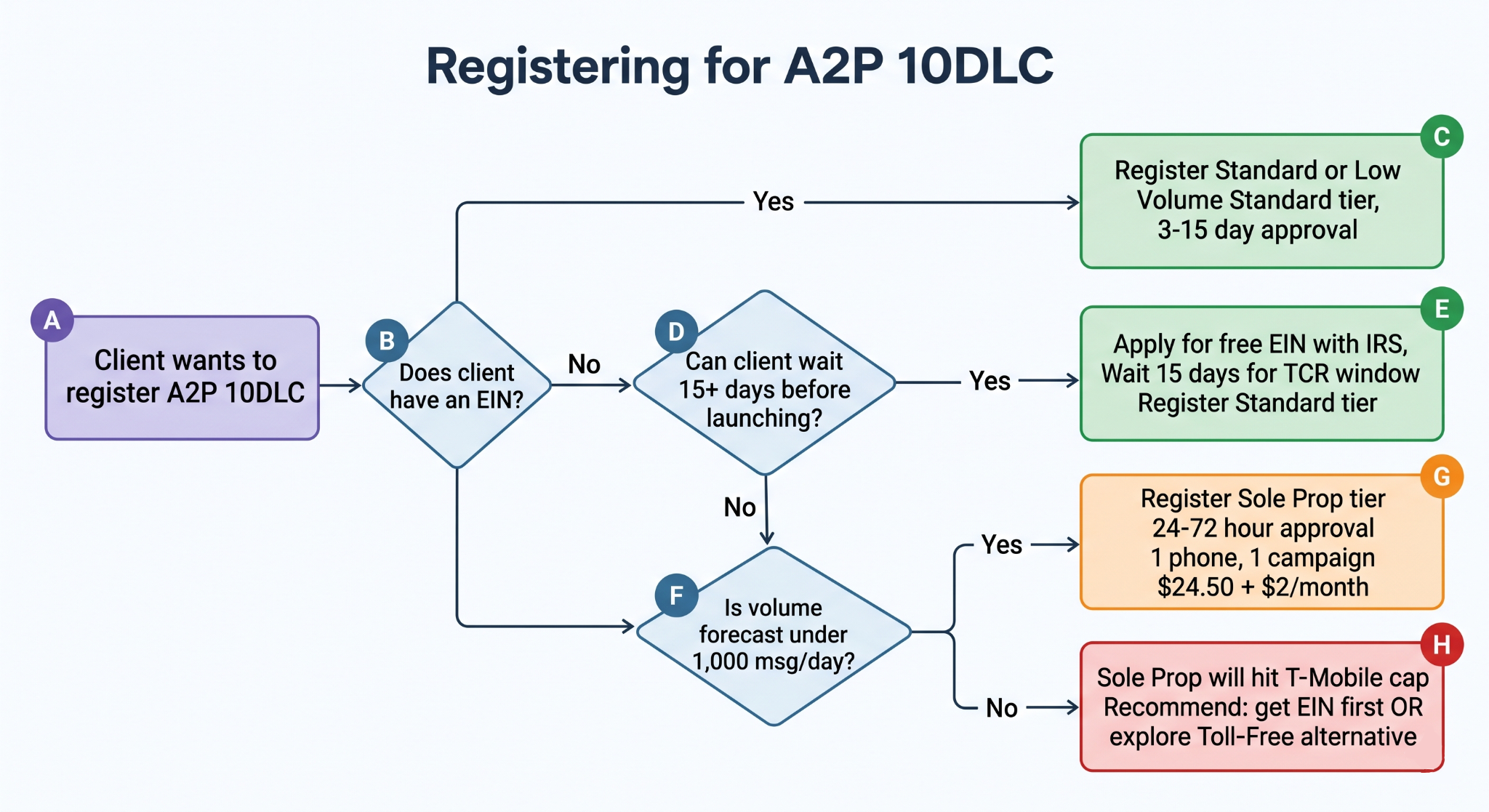
The decision tree at the end of this guide will help you tell the client whether to proceed Sole Prop or take 15 days to get an EIN first.
Who this guide is for
Primary audience: GoHighLevel agency owners onboarding Sole Proprietor clients without a Tax ID.
Secondary audience: Solo agency owners registering their own GHL number under their personal identity.
Skip this guide if: Your client has an EIN. The Standard or Low Volume Standard tier is the right path for them — higher throughput, broader use case selection, and full Additional Message Details (Embedded Link, Phone Number, Financial Services, Age-Gated). Sole Prop is specifically for individuals operating without any tax ID.
Can you actually register A2P 10DLC without an EIN?
Short answer: yes.
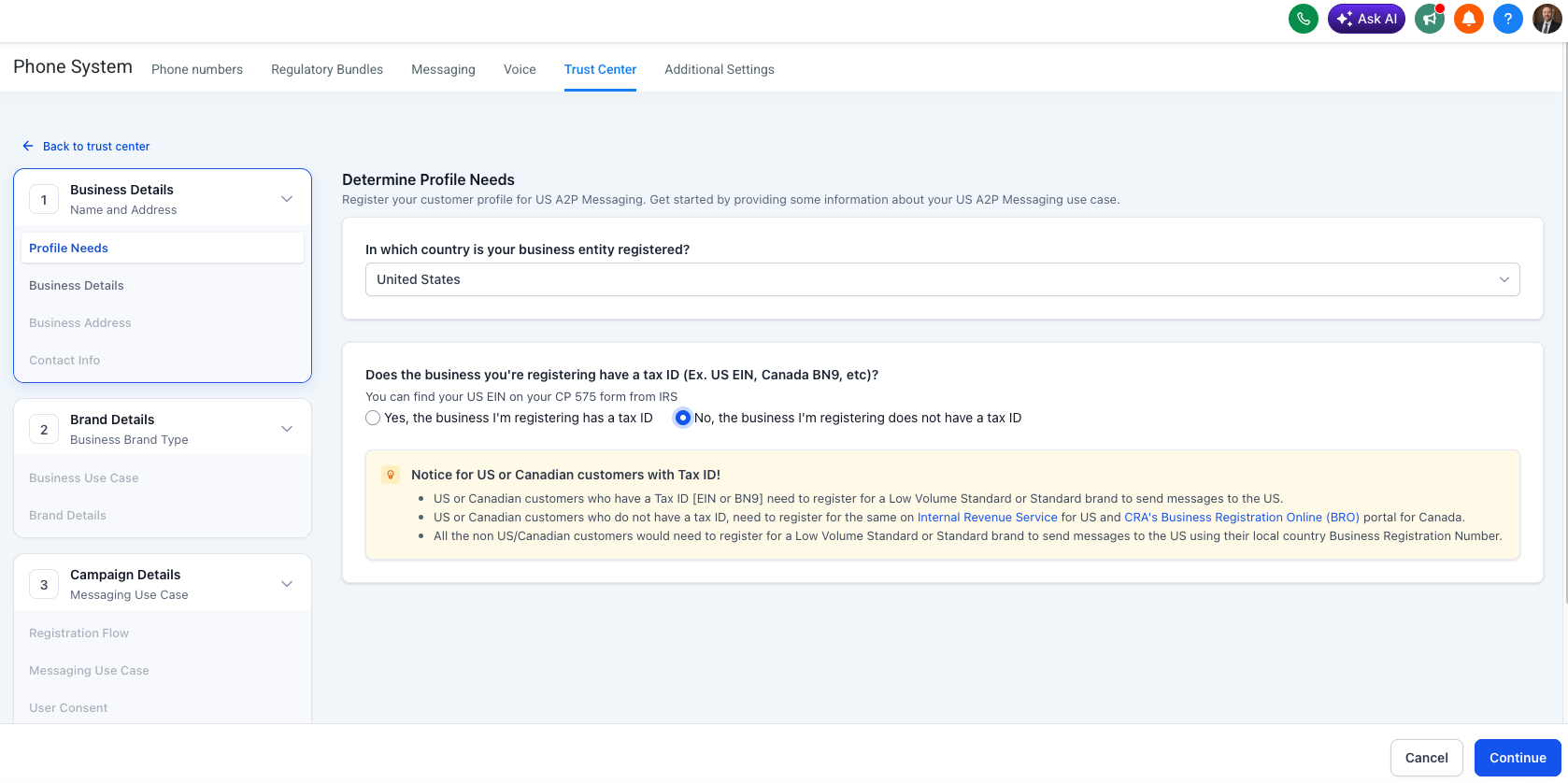
Long answer: GoHighLevel’s Trust Center has a dedicated Sole Proprietor brand tier specifically for U.S. and Canadian individuals operating under their own name with no formal business entity, no Tax ID, and no employees beyond themselves. When you start a brand registration in Trust Center, the second question is “Does the business have a Tax ID (EIN/BN9)?” — and selecting “No” routes you down the Sole Prop path.
This isn’t a workaround or a back door. It’s an officially supported tier that The Campaign Registry and the major U.S. carriers (T-Mobile, AT&T, Verizon) have designed to handle small individual senders. The tradeoff is built into the tier: faster approval and lower fees, in exchange for hard throughput caps and feature restrictions.
The eligibility criteria are strict and worth reading carefully:
- The business must be in the U.S. or Canada (other regions follow different carrier rules)
- The person must have no Tax ID — if they have one and registered Sole Prop anyway, the application gets rejected during vetting
- One employee (the proprietor)
- The brand must use the proprietor’s legal name or a registered DBA — not an invented business name
- The contact phone must be the proprietor’s personal cell — not a VoIP, Google Voice, or virtual number
If any of those criteria don’t fit, Sole Prop is the wrong tier and the application will fail. We had a real-estate client last month who we were setting up, and she tried using a Google Voice number without telling us. Guess what happened? She would have failed if it weren’t for us catching this. Easy solution: we bought her a phone number in GHL and forwarded it to her Google Voice number. Quick and easy.
Sole Proprietor vs. Low Volume Standard — the honest comparison
Most existing content on this topic gets the numbers wrong. The chart below comes from GoHighLevel’s published A2P 10DLC fees and pricing documentation and Easy A2P’s internal compliance ruleset, which we update as TCR and carrier policies change.
| Factor | Sole Proprietor (No EIN) | Low Volume Standard (EIN) |
|---|---|---|
| EIN required | No | Yes |
| Daily segments (overall) | 3,000 | 6,000 |
| T-Mobile daily cap | 1,000 | 2,000 |
| Phone numbers | 1 only | Multiple |
| Campaigns per brand | 1 only | Multiple |
| Trust Score | None (skips vetting) | Variable, assigned at vetting |
| One-time fee | $24.50 (Fast Track included) | $24.50 (Fast Track included) |
| Monthly fee | up to $2.21 | up to $11.03 |
| Approval time | 24–72 hours | 3–15 days |
| Use case category | Locked to “Sole Proprietor” | Wide range available |
| Additional Message Details | Age-Gated Content only | Embedded Link, Phone Number, Financial Services, Age-Gated all available |
A few things to notice:
Sole Prop without an EIN is the cheaper monthly option. Up to $2.21/month for the no-EIN Sole Prop tier versus up to $11.03/month for every other tier — including a Sole Proprietor brand that has an EIN — per GHL’s published A2P fee schedule. The case for moving to an EIN-backed tier is about throughput and feature access — not monthly cost.
Having an EIN moves you out of the $2.21 bracket. The $2.21/month rate applies only to Sole Proprietor brands registered without an EIN. If your client is a sole proprietor who already has an EIN — or applies for one later — they register under an EIN-backed tier and pay up to $11.03/month, the same as every other entity type. That’s roughly a 5x jump in recurring cost. An EIN unlocks higher throughput, multiple phone numbers, multiple campaigns, and a Trust Score — but it also exits them from the cheapest monthly bracket. If a client is weighing an EIN purely for A2P purposes, factor that monthly delta into the recommendation.
Fast Track is bundled into the registration fee. The $24.50 one-time fee includes Fast Track, which expedites campaign approval to within 3 working days. There’s no separate Fast Track add-on to opt into.
The throughput ceiling is real. A real-estate agent texting 50 listing alerts per day fits comfortably. A solo coach blasting 800 reminders a day fits. An agency-managed funnel sending 2,000 promotional messages a day will saturate T-Mobile’s cap by mid-morning and get filtered for the rest of the day. If your client’s volume forecast is over 1,000/day, Sole Prop will fail them.
Limited Additional Message Details is the most under-discussed restriction. When you submit a campaign in Trust Center, you check boxes describing what’s in your messages — embedded links, phone numbers, financial content, age-gated content. These flags affect carrier filtering and compliance interpretation. Sole Prop only gives you one of those checkboxes (Age-Gated Content). If your messages contain links or phone numbers, you can’t disclose them at the campaign level — which means certain compliance signals you’d normally rely on aren’t available to you.
Sole Prop Brand vs. Sole Prop Campaign — the distinction most guides miss
This is the source of more rejections than you’d expect. Sole Prop has two stacked structures:
Sole Proprietor Brand is the business identity. It’s the legal name, address, contact info, and verification of the individual proprietor. You register the brand once. The brand is what shows up in Trust Center as “Easy A2P” or “Gary Vogt Consulting” or whatever the proprietor’s name is.
Sole Proprietor Campaign is the messaging program tied to that brand. The campaign defines what kinds of messages get sent, the use case, sample messages, the opt-in flow, the consent text. Each Sole Prop Brand can have exactly one Sole Prop Campaign attached to it.
Why this distinction matters: when you fill out the registration in GHL, the brand step asks for one set of information (legal name, address, phone), and the campaign step asks for another (use case, samples, opt-in). Agencies sometimes try to register a brand and assume the campaign is automatically created, or they try to register multiple campaigns under one Sole Prop Brand. Both fail. One brand, one campaign, end of story.
If you need a second campaign — say, a promotional campaign separate from the appointment-reminder campaign — you cannot do that on Sole Prop tier. You’d need a Standard or Low Volume Standard registration with an EIN to support multiple campaigns under one brand.
The “should I just get an EIN?” decision tree
Most agency owners default to “the client doesn’t have an EIN, let’s just register Sole Prop.” That’s often wrong. Here’s the actual decision logic:
Stay Sole Prop if all of these are true:
- Client’s monthly message volume is under 25,000 (under 1,000/day average)
- Single channel — one funnel, one type of message program
- Client has no plans to expand to multiple SMS use cases
- The client wants to launch in the next 1-2 weeks and can’t wait
Push for an EIN if any of these are true:
- Client volume forecast is over 1,000/day (you’ll hit T-Mobile’s cap)
- Client wants both transactional and promotional messaging programs
- Client plans to scale to multiple phone numbers
- Client is a registered LLC, Corp, or Partnership operating personally — they likely already have or can quickly get an EIN
- The client is committed to scaling messaging volume and feature use over time (the throughput and feature-set difference compounds; monthly cost actually favors Sole Prop)
The 15-day TCR window for new EINs. If your client doesn’t have an EIN today and is willing to apply for one, they can get one for free from the IRS in about an hour. But TCR’s brand vetting system can’t verify EINs that are less than 15 days old — applications submitted with brand-new EINs come back as “Unverified” and require manual review (sometimes with an $11 vetting appeal fee plus a copy of the IRS CP 575 letter).
So the practical timeline for an EIN-backed Standard registration is:
- Day 1: Apply for EIN with the IRS (free, ~1 hour, online)
- Days 2–14: Wait for the 15-day TCR window to elapse
- Day 15+: Submit Standard tier brand registration in GHL Trust Center
- Days 18–30: Standard tier approval (typically 3-15 days from submission)
If the client absolutely needs to send messages tomorrow, Sole Prop is the only option. If they can wait a month, Standard tier almost always wins on cost, throughput, and feature set.
Easy A2P helps here. Our copy review system catches the “EIN issued less than 15 days ago” trap automatically and warns you before you waste a submission. We also flag when a client’s volume forecast exceeds Sole Prop’s tier ceiling, recommending they upgrade to a Low Volume Standard registration with an EIN. Try it free with 3 credits →
Step-by-step Sole Prop registration in GHL Trust Center
Open GoHighLevel, navigate to Settings → Phone System → Trust Center, and click Add Brand. Trust Center walks you through five steps. Here’s what each step actually wants and where the rejection traps hide.
Step 1 — Profile Needs
Two questions:
-
Country (where business entity is registered): Pick the actual country. For most U.S. agencies this is “United States.” If your client operates in Canada, pick Canada. Other regions are not supported by Easy A2P or by GoHighLevel’s standard Trust Center flow.
-
Does the business have a Tax ID (EIN/BN9)? Select No. This is the gate that routes the rest of the registration down the Sole Prop path. If you select Yes here and the client doesn’t actually have a Tax ID, the application gets rejected. If you select No and the client does have one, the application also gets rejected — TCR cross-references against IRS records.
After this step, GHL shows an informational note about the Sole Prop tier’s fees, throughput limits, and feature restrictions. Read it. Confirm the client is OK with the tradeoffs before continuing.
Step 2 — Business Details
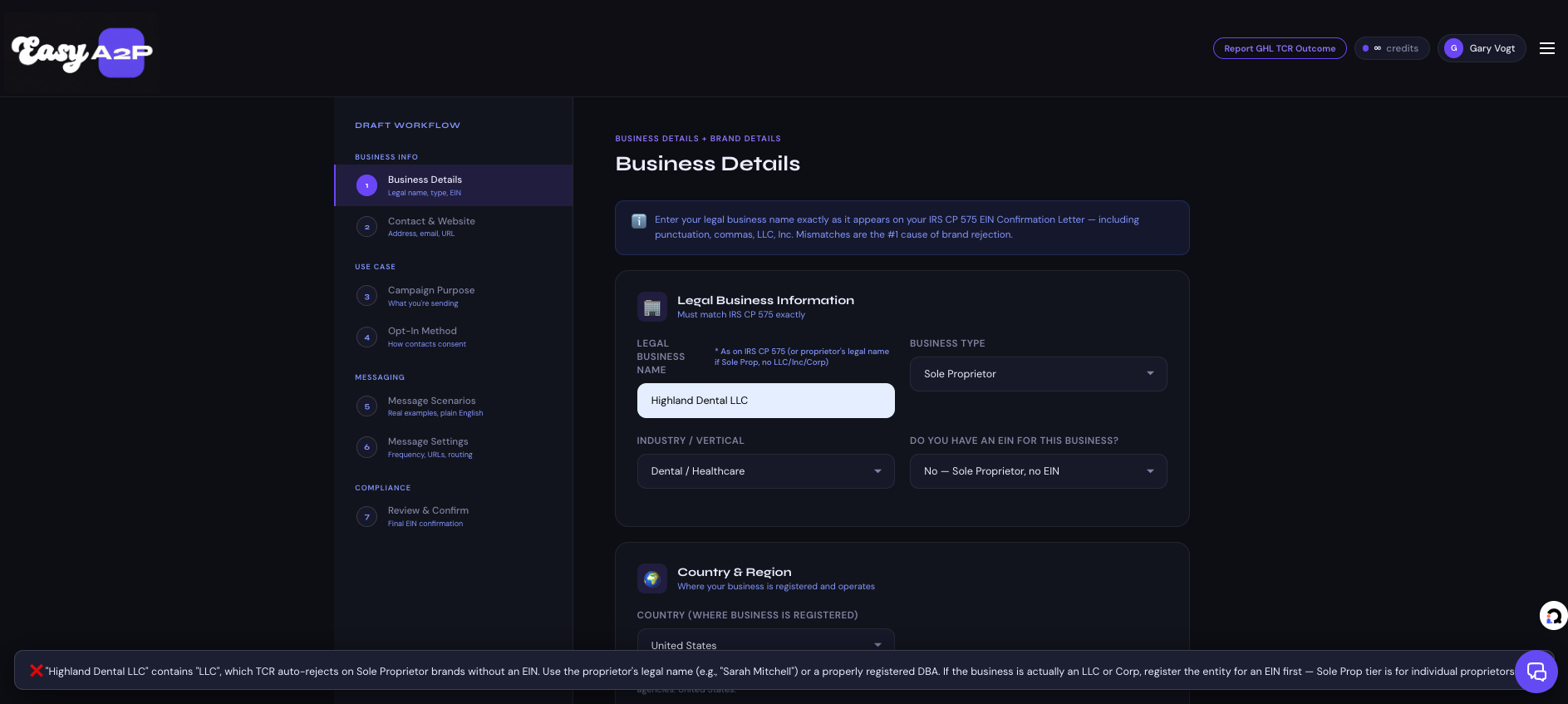
This is where most rejections happen. Five fields:
-
Legal Business Name. This must be either the proprietor’s actual legal name (e.g., “Sarah Mitchell”) or a properly registered DBA filed with the state (“Sarah Mitchell Real Estate”). It cannot be an invented business name the client uses informally.
Pitfall #1: Don’t include corporation-suggesting terms. No “LLC”, “Inc.”, “Corp”, “Company”, “Co.”, “Team”, “Group”, or “Partners”. TCR’s automated screening looks for these words and auto-flags brands as misregistered. If the client introduces themselves as “Mitchell Realty Group” but the business is legally just Sarah Mitchell operating as a sole proprietor, the brand name should be “Sarah Mitchell” or “Sarah Mitchell Real Estate” (if that DBA is on file with the state) — never “Mitchell Realty Group”.
-
Business Type. Select “Limited Liability Company Or Sole-Proprietorship” from the dropdown. (Yes, the dropdown groups these together. Sole Props pick this option.)
-
Business Registration ID Type. Select “USA: Employer Identification Number (EIN)” even though you don’t have one — Trust Center will populate “N/A” or similar based on your earlier “No Tax ID” answer.
-
Business Industry. Pick the closest match to what the client actually does. Real estate, professional services, consulting, healthcare, fitness, beauty, etc. Pitfall: don’t mismatch this with what your sample messages say. If the industry says “Real Estate” but the samples are about appointment reminders for a hair salon, the inconsistency causes rejection.
-
Business Region of Operations. Check USA & Canada if your client serves U.S. customers. Don’t check Africa, Asia/Pacific, Europe, or Latin America unless the client is genuinely operating there — and if they are, Sole Prop tier may not be the right path.
Step 3 — Business Address
The client’s physical street address. Three rules:
- Must be a real physical address. Not a PO Box. Not a UPS Store mailbox. Not a virtual office service. TCR cross-references against business registries and will flag PO Boxes during vetting.
- The address should match what’s publicly findable. TCR does look up the proprietor — they Google the name, check LinkedIn, look at the address on any registered DBA. Inconsistencies between the registered address and what’s publicly visible cause manual review delays.
- For solo home-based businesses, use the home address. This is allowed. The address won’t be publicly displayed; it’s only for Trust Center’s vetting purposes.
Step 4 — Authorized Representative
For Sole Props this is the proprietor themselves. Five fields:
- First Name and Last Name — the proprietor’s actual legal name as it appears on their ID
- Email — for Sole Prop tier, freemium domains (Gmail, Yahoo, Outlook, iCloud) are acceptable. This is different from Standard tier, where freemium emails slow approval. Sole Props are explicitly expected to use personal email.
- Phone Number — and this is where rejection trap #2 hides.
Pitfall #2: The phone must be a personal cell carrier number. Specifically:
- Allowed: A real mobile number from Verizon, AT&T, T-Mobile, US Mobile, Mint, Visible, Cricket, etc. — any major or MVNO carrier
- Auto-rejected: Google Voice, Twilio numbers, TextNow, virtual numbers, VoIP lines, landlines, fax lines, business toll-free numbers
Trust Center sends an OTP (one-time password) to verify the number during registration, and TCR’s vetting system additionally cross-checks that the number is mobile-carrier-issued. Both checks have to pass.
Pitfall #3: One phone number per Sole Prop brand. Each Sole Proprietor brand registration is tied to a single phone number, and that phone number can only be approved on one Sole Prop brand. If you’re an agency registering Sole Prop brands for multiple clients, each brand needs a different personal phone number — typically the proprietor’s own personal cell. You cannot reuse your own phone across multiple client Sole Prop registrations.
- Job Position — for Sole Props this is usually “Owner” or “Founder” or simply the role they describe themselves as.
Step 5 — User Consent (Campaign step)
After the brand is submitted, GHL takes you to the campaign registration step automatically. The campaign use case dropdown is locked to “Sole Proprietor” — you cannot change it. Whatever the proprietor’s actual messaging purpose is (appointment reminders, marketing, customer care), it gets registered under the umbrella Sole Prop use case.
This is the step where your sample messages, opt-in flow description, opt-in confirmation message, and consent checkbox text all get submitted. The same compliance rules apply as in Standard tier registrations — STOP language, business name in samples, no merge field placeholders, no purchased-list language, etc.
The major difference at the campaign step: Additional Message Details restrictions. Standard tier campaigns can flag Embedded Link, Phone Number, Financial Services, and Age-Gated Content. Sole Prop campaigns can only flag Age-Gated Content. So if your sample messages contain links or phone numbers, you can’t disclose them at the campaign level — which can affect carrier filtering decisions later.
The 8 most common Sole Proprietor rejections in 2026
Pulled from GoHighLevel’s own documentation, Twilio’s troubleshooting docs, Telgorithm’s published rejection statistics, and Easy A2P’s internal copy review rule library — these are the eight rejection causes responsible for the vast majority of Sole Prop failures.
1. Business name contains corporation-suggesting words
Trigger words: LLC, Inc., Corp, Company, Co., Team, Group, Partners, Enterprises, Holdings, Solutions
Fix: Use the proprietor’s legal name only (“Sarah Mitchell”) or a properly state-registered DBA (“Sarah Mitchell Real Estate”). Never invent a business name to make it sound more substantial.
2. Phone number is VoIP, Google Voice, or virtual
Triggers: Google Voice numbers, Twilio numbers, TextNow numbers, business toll-free numbers, virtual receptionist services, fax-only lines, landlines.
Fix: Get a real personal cell phone number from a major carrier. If the proprietor doesn’t have one, this is a prerequisite before attempting registration.
3. Phone number already approved on a Sole Prop brand
Trigger: Trying to register a Sole Prop brand using a phone number that’s already tied to another Sole Prop brand. Each phone number can only be approved on one Sole Prop brand.
Fix: Each Sole Prop brand needs a distinct personal phone — typically the proprietor’s own. Agencies cannot reuse a single phone across multiple client registrations.
4. Address is a PO Box or virtual mailbox
Triggers: PO Box addresses, UPS Store mailboxes, Regus / WeWork / virtual office services, mail forwarding services.
Fix: Use a physical street address — typically the proprietor’s home or the actual business location. If privacy is a concern, recognize that TCR vetting requires this and the address won’t be publicly displayed in carrier records.
5. Person has no online presence
Trigger: TCR’s vetting team Googles the proprietor and finds nothing — no LinkedIn, no business website, no social media, no public reviews. This signals a potentially fraudulent registration.
Fix: Before submitting, ensure the proprietor has at minimum a basic LinkedIn profile, a Google Business Profile (if the business is local), or a simple personal/business website that mentions their name and the business they operate. This is a real check Easy A2P calls out in our Sole Prop No-EIN advisory: “Twilio/TCR actually looks up the person. If they don’t have an online presence, it can get rejected.”
6. Terms of Service missing required SMS clauses
The Sole Prop campaign step requires a public Terms of Service page that includes SMS-specific language. Easy A2P’s copy review system enforces seven required clauses:
- Business Identity / Program Description
- STOP opt-out instructions (universal, not scoped to one message type)
- HELP support instructions with contact info
- Carrier Liability disclaimer (“Carriers are not liable for delayed or undelivered messages”)
- Message Frequency & Rates disclosure
- Privacy Policy cross-link
- Age Restriction (18+) statement — GHL’s compliance tooling now flags ToS that lacks this clause as a hard failure
Missing any one of these causes rejection.
7. Privacy Policy missing required SMS section
The Privacy Policy must explicitly cover the SMS messaging program. Required elements:
- Description of what personal information is collected (phone number, name, etc.)
- How the SMS program uses that information
- The TCR non-sharing clause: “No mobile information will be shared with third parties/affiliates for marketing/promotional purposes. Information sharing to subcontractors in support services, such as customer service, is permitted. All other use case categories exclude text messaging originator opt-in data and consent; this information will not be shared with any third parties.”
- Data Security disclosure (now enforced by GHL’s compliance tooling)
Privacy Policies that mention selling or sharing SMS opt-in data with third parties are an automatic rejection — and TCR’s vetting team checks for this language explicitly.
8. Business name doesn’t match person’s actual identity
Trigger: The legal business name on the brand doesn’t match what TCR finds when they look up the proprietor (e.g., “John Smith Consulting” registered, but TCR’s search shows the person operates as “ABC Marketing Solutions” online).
Fix: Ensure the registered name matches what the proprietor uses publicly. If they have a registered DBA, the DBA name and address need to be consistent across the registration, the website, social media, and Google Business Profile.
What you can’t do as a Sole Proprietor
A few hard limits worth knowing before you commit a client to this tier:
- Cold outreach is permanently banned. This applies at every tier, but Sole Prop registrations are scrutinized more heavily for it. Any campaign description that hints at outreach to non-opted-in contacts (purchased lists, leads from third parties, “we contact homeowners about their property”, etc.) gets rejected.
- Lead generation use cases are off-limits. Sole Prop tier doesn’t support outbound prospecting campaigns under any framing.
- SHAFT content (Sex, Hate, Alcohol, Firearms, Tobacco) is universally banned. Sole Prop doesn’t change this.
- Multi-channel scaling isn’t possible at this tier. One brand, one campaign, one phone number. If the client needs more, they’re upgrading to Standard or Low Volume Standard.
- You cannot switch use case categories. The campaign use case is locked to “Sole Proprietor” — you can’t reclassify it as “Marketing” or “Customer Care” or “2FA” later.
Graduating to Standard tier when the client gets an EIN
A common path: client starts on Sole Prop because they don’t have an EIN, message volume grows or they incorporate properly, and now they need to migrate. Here’s how that works.
Once the client has an EIN that’s at least 15 days old, you can register a fresh Standard or Low Volume Standard brand in Trust Center. This is a separate registration — you cannot “upgrade” the existing Sole Prop brand. The new brand goes through its own vetting process (3-15 days for Low Volume Standard).
During the migration window, you have two options:
Run them in parallel. The Sole Prop brand keeps running on its existing campaign while the new Standard brand goes through vetting. Once the Standard brand is approved, switch the LC Phone number assignment from the Sole Prop brand to the Standard brand and decommission the Sole Prop registration.
Cut over at submission. Stop messaging on the Sole Prop brand the day you submit the Standard registration. Wait through the vetting period (3-15 days with no SMS). Resume on the Standard brand once approved.
Most agencies pick the first option — keep the Sole Prop running for continuity, then quietly retire it once Standard is live.
One thing to communicate to the client during this transition: their phone number stays the same. The brand registration changes, but recipients don’t see anything different.
Common questions and quick answers
The eight most-asked questions are answered in the FAQ section below this article — they’re rendered in the page schema so Google’s AI Overviews and search snippets can pull from them directly. Common ones include throughput limits, monthly fees, phone number rules, approval timelines, and rejection patterns.
A final note on what makes Sole Prop registration hard
The mechanical steps of Sole Prop registration aren’t difficult. The fields are straightforward, the documentation is reasonable, and the approval is fast.
What makes it hard is the invisible layer of compliance review sitting on top of every Sole Prop submission. TCR’s vetting team is more skeptical of Sole Prop registrations than Standard ones because the tier is more easily abused — anyone can claim to be a sole proprietor with just a name and phone. So the bar for “looking legitimate” is higher: real online presence, consistent business identity across the registration and the public web, real personal phone, real physical address, fully compliant Privacy Policy and Terms of Service.
Most rejections come down to small details — an LLC in the name, a Google Voice number, a missing 18+ clause in the ToS, a Privacy Policy that doesn’t say what TCR needs it to say. Each detail looks minor in isolation. The rejection email rarely tells you exactly which one tripped the system. So you guess, fix something, resubmit, and wait another 24-72 hours.
That’s the loop Easy A2P was built to short-circuit. The copy review system catches every Sole Prop-specific rejection pattern in this guide before submission, including the tier-specific ones (Sole Prop name restrictions, phone number reuse limits, restricted Additional Message Details, the EIN 15-day window). Most agencies recover the cost of the credits on a single avoided resubmission.
If you’re staring at a Sole Prop registration right now, it’s worth running it through Easy A2P before submitting. The review takes about 90 seconds, the first 3 credits are free, and you’ll know whether you’re about to hit any of the eight traps in this guide.
Frequently Asked Questions
Can I register A2P 10DLC without an EIN? +
What's the daily message limit for Sole Proprietor A2P 10DLC? +
Why was my Sole Proprietor A2P 10DLC brand rejected? +
Do Sole Proprietors get a Trust Score for A2P 10DLC? +
Can I use Google Voice as my Sole Proprietor A2P 10DLC phone number? +
Is there a monthly fee for Sole Proprietor A2P 10DLC? +
How long does Sole Proprietor A2P 10DLC approval take? +
How many Sole Proprietor brands can I register per phone number? +
Get notified when we publish new guides
Pillar guides on TCR rejection codes, GHL Trust Center walkthroughs, and industry-specific A2P 10DLC compliance — delivered when they go live. No spam, unsubscribe anytime.
Stop guessing whether your A2P submission will pass.
Easy A2P validates your full submission against current TCR and GHL standards before you submit. Catch the rejection causes others miss — including the Sole Proprietor traps in this guide.
Try Easy A2P with 3 free credits →No credit card · ~90 seconds to validate · pay-as-you-go after